The Day I Decided to Build an App
Apps have always felt a little magical to me. Even with a coding background, I assumed app developers possessed something extra - a different language, a sharper imagination, or some mysterious graphical wizardry.
We download apps every day without thinking about the person behind them. I certainly never imagined that person would be me.
The Problem: Cluttered Scoreboard Apps
My husband plays in a local basketball league and also happens to be the chairman of his club. One day, after seeing my slimline portable monitor, he decided it was time to streamline their kit bags. His idea was simple: mirror a scoreboard app onto the monitor.
Except every app he tried had something wrong with it.
The scores were too small. The interface was cluttered. Nothing felt intuitive.
After the fifth or sixth download-and-delete cycle, I joked “If you can’t find on you like, I’ll just make you one.”
It was an off-the-cuff comment… but it stuck.
Rogue Promise to Newfound Joy
Months passed. I assumed he’d found a solution and moved on. Then, late last year, he casually asked “Do you still fancy giving that app a go?”
Cue the nerves.
I’m not great with the idea of failing - if I say I’ll do something, I will try my hardest to make it happen. But something in me said yes.
And I’m so glad it did.
Because what I found wasn’t just a project. It was a spark. A reminder of why I fell in love with coding in the first place.
Building the App with .NET MAUI
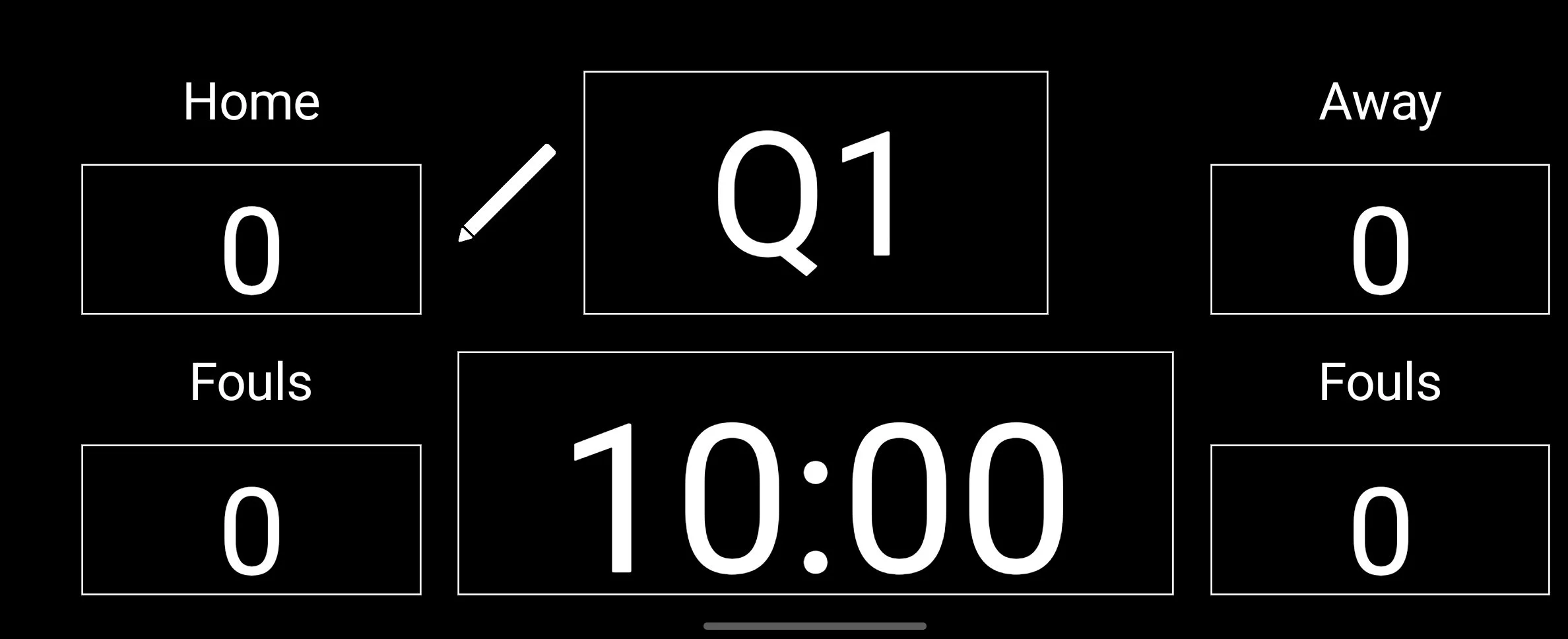
Screenshot of the basketball scoreboard app
After some research, I decided to use .NET MAUI to create my new Scoreboard app. It let me use my C# knowledge and only required learning XAML rather than starting from scratch.
Fast forward to today: the Scoreboard app is fully coded.
The interface is exactly what my husband envisioned - clean, simple, and readable from across a court. Large scores. A clear timer. Team names, fouls, quarters. Tap to increase scores, start the countdown, bump the quarter, or switch to manual mode.
It works. It’s intuitive. And he loves it.
Hitting a Roadblock: Google Play’s Testing Requirements
With the app complete, it was time to publish it on Google Play. As Android users, it felt like the obvious choice.
I set up my developer account, paid the fee, verified my identity, fixed my icons and splash screens… all the usual first-time developer hurdles.
Then came the big one.
Google requires new apps to go through Closed Testing - with a minimum of 12 testers using the app for 14 consecutive days.
So if you’ve ever wanted a basketball scoreboard on your phone… let me know.
Where This Leaves My App
This whole experience has been eye-opening. It reignited my love for “proper” coding and reminded me how much I enjoy building things from scratch. But it’s also frustrating to have an app ready to go that can’t yet reach the people who need it.
Pros:
I learned how to build a .NET MAUI app and use XAML.
I rediscovered my excitement for coding.
My husband now has a working scoreboard he uses.
Google is trying to improve app quality.
Cons:
The testing requirements make it harder for independent developers to launch apps.
It’s discouraging when you’re trying to build a new income stream.
Other team members can’t use the app yet.
Closing Thoughts
Even with the hurdles, I don’t regret saying yes to that offhand promise. This little project reminded me that I’m capable of more than I give myself credit for - and that sometimes the best journeys start with a simple, “I’ll give it a go.”